

mlmm-toolkit Documentation
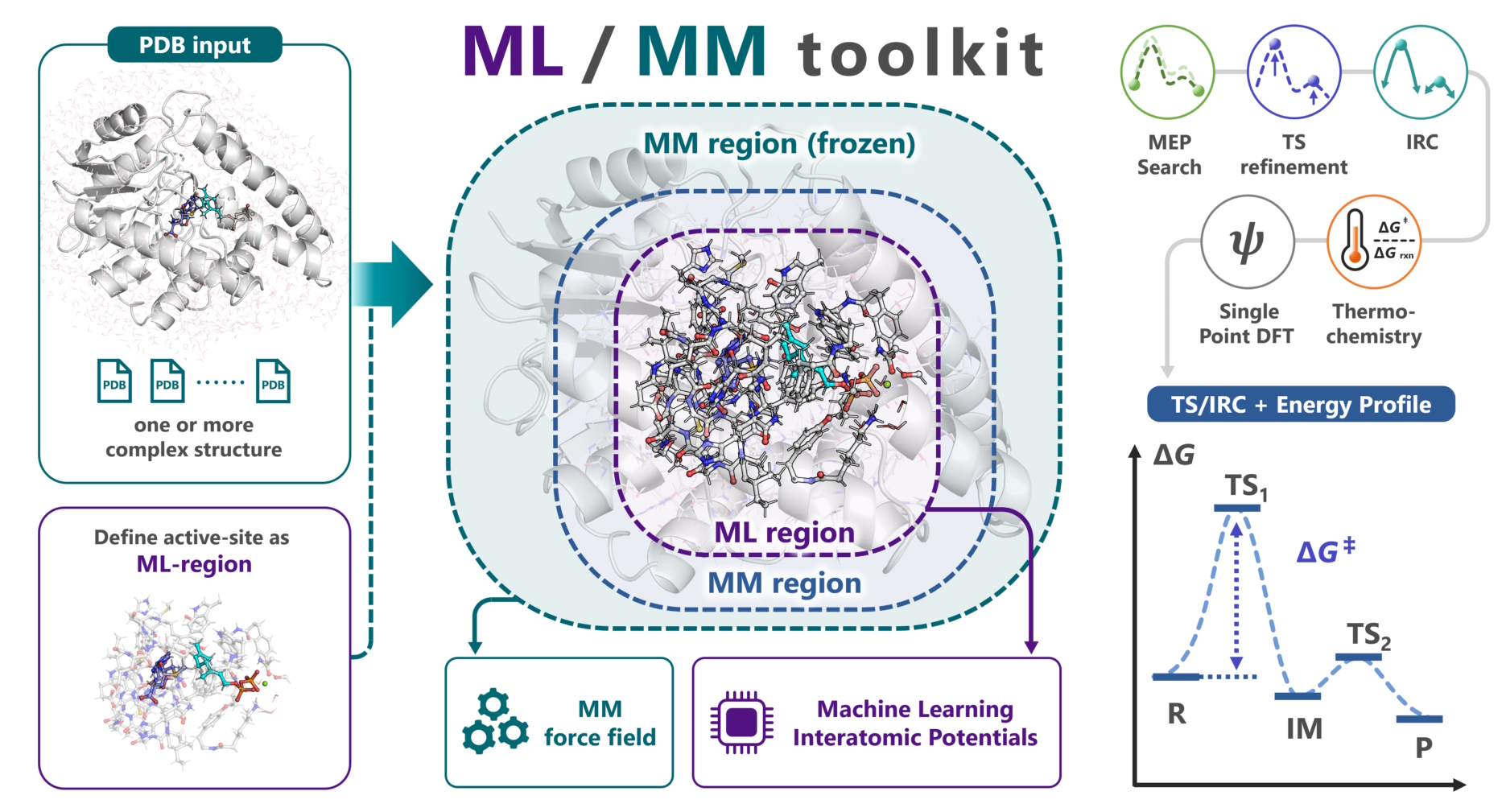
mlmm-toolkit is a Python CLI toolkit for analyzing reaction mechanisms in enzyme complexes with ML/MM, an ONIOM combination of machine-learning interatomic potentials (MLIPs) and molecular mechanics (MM), starting from PDB/mmCIF structures.
New to mlmm-toolkit? Start with Getting Started.
Quick start
Analyze the mechanism end to end from the structures before and after the reaction
Analyze the mechanism end to end from one structure
Analyze the mechanism end to end from a TS structure
Goal |
Page |
|---|---|
Choose the ML region and layers, or make a run lighter |
|
Study a mechanism, or the TS search fails |
|
Optimize the TS structure with DFT |
|
A run failed |
Subcommands
Subcommand |
Description |
|---|---|
ML/MM model setup and MEP search; optional TS, IRC, thermochemistry, and DFT |
|
Resolve PDB alternate locations |
|
Repair PDB element columns (77–78) |
|
Build Amber parm7/rst7 topology and coordinates |
|
Define the ML region from a protein–ligand complex |
|
Assign ML / Movable-MM / Frozen-MM B-factor layers |
|
Single-structure geometry optimization (L-BFGS or RFO; optional |
|
Restrained distance scan supporting concerted multi-distance and multistage scans |
|
Two-dimensional energy-landscape exploration and PES mapping |
|
Three-dimensional energy-landscape exploration and PES mapping |
|
Single-step MEP optimization via GSM or DMF (from 2 structures) |
|
Recursive multi-step MEP search with automatic refinement (2+ structures) |
|
Transition state optimization (Dimer or RS-P-RFO; optional |
|
Intrinsic Reaction Coordinate calculation |
|
Vibrational frequency analysis & thermochemistry |
|
Single-point DFT calculations (GPU4PySCF / PySCF) |
|
ML/MM ONIOM energy and forces; optional Hessian |
|
Detect and report covalent bond changes between consecutive structures |
|
Plot energy profiles from XYZ trajectories |
|
Draw an energy diagram from numeric values |
|
Generate Gaussian ONIOM or ORCA QM/MM input |
|
Read an ONIOM input into XYZ / layered PDB |
Configuration and reference
Topic |
Page |
|---|---|
Common options and input requirements |
|
Frozen atoms and distance restraints ( |
|
Common errors and fixes |
|
CLI command reference |
|
YAML configuration options |
|
MLIP backend settings |
|
Files each command writes |
|
Keys of |
|
GPU and CPU assignment, HPC |
|
Use the ML/MM calculator from Python |
|
Using mlmm-toolkit from an AI agent |
|
Code structure (for developers) |
|
Terminology |
System requirements
Hardware
OS: Linux (on Windows, install it in Linux under WSL2).
GPU: an NVIDIA driver compatible with the backend and PyTorch wheel. CPU execution is also supported but slower.
VRAM / RAM: depends on the model, the system size, and the Hessian mode; measure the peak on a representative run.
Software
Python >= 3.11.
CPU or CUDA-enabled PyTorch. Prebuilt wheels include their CUDA runtime; a local toolkit is normally needed only for source builds.
AmberTools, which
mm-parmuses to build the Amber topology.
See Installation for setup.
Key concepts
The three layers (ML, Movable-MM, Frozen-MM) and how ONIOM combines them are explained in Getting Started; how to choose the ML region and layers is in Building the ML region and layers.
Agent skills
skills/ contains guides for CLI commands, structure I/O, backends, workflows, output analysis, and HPC use.
To install them, tell your AI agent:
Import
https://github.com/t-0hmura/mlmm_toolkit/tree/main/skillsas skills, and install mlmm-toolkit by followingmlmm-install.
If you cloned the GitHub repository, you can give the local skills/ path instead. Then you can ask, for example:
Read the paper, build a model from the PDB structure PDB ID, and study the mechanism of the reaction step with the mlmm-toolkit skills.
For details, see Skills for AI Agents.
Citation
If you use mlmm-toolkit in your research, cite the ChemRxiv paper:
@article{ohmura2025mlmm,
  author  = {Ohmura, Takuto and Inoue, Sei and Terada, Tohru},
  title   = {ML/MM toolkit -- Towards Accelerated Mechanistic Investigation of Enzymatic Reactions},
  journal = {ChemRxiv}, year = {2025}, doi = {10.26434/chemrxiv-2025-jft1k}
}
To cite the software or a specific release, use the Zenodo record:
@software{ohmura2026mlmm_software,
  author       = {Ohmura, Takuto},
  title        = {mlmm-toolkit},
  year         = {2026},
  version      = {0.4.0},
  url          = {https://github.com/t-0hmura/mlmm_toolkit},
  license      = {GPL-3.0-or-later},
  doi          = {10.5281/zenodo.19197863}
}
License
GNU General Public License v3 or later (GPL-3.0-or-later).
Getting Help
# General help
mlmm --help

# Command help
mlmm <subcommand> --help

# Advanced options (internal tuning)
mlmm <subcommand> --help-advanced
Report problems and feature requests on GitHub Issues.